Admin list layouts, choose the page size on listing pages - This week in Orchard (06/11/2026)
Want to read your content items as a grid with column headers instead of a list? Admin lists can now be rendered in a Grid layout, with a compact actions menu and a per-user layout selector.
Want users to choose how many items they see on a listing page, without changing the site-wide page size? A new opt-in selector lets them pick from a list of values you configure.
And wondering which CodeAnalysis packages work with which .NET SDK? A new guide for upgrading the SDK of Orchard Core explains how the SDK, Roslyn, and the CodeAnalysis packages have to line up.
We also show a new Orchard Core site: SBK Healthcare.
This week's changes come from Mike Alhayek and Georg von Kries.
Orchard Core updates
Allow users to select records per page on listing pages
Orchard Core uses the page size from the general site settings as the number of records displayed per page. This gives you a consistent setting across the admin UI, but users can't choose how many records they want to see on a particular listing page.
Mike Alhayek added an opt-in page size selector to admin listing pages. An administrator enables it in the site settings and provides the list of allowed values. A selector then appears next to the pager on listing pages, and controllers honor the selected size when it is valid.
To try it, go to Settings -> General and tick the new Allow users to change the page size on listing pages checkbox. Then you can specify the page size options as a comma-separated list. Values can't exceed the maximum page size of 100. We added 75 to the list, so it became 10, 25, 50, 75, 100.
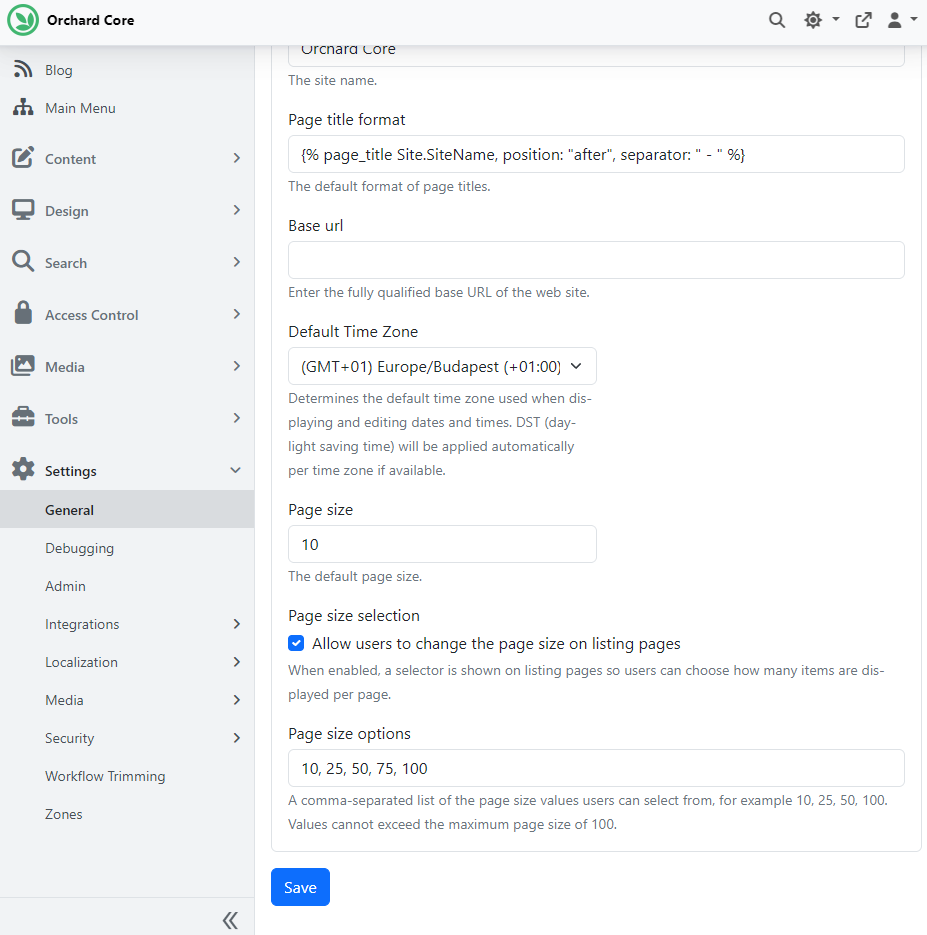
Now go to Content -> Content Items. You will find the new Items per page selector below the list, and 75 is now one of its options. The selector is the Pager_PageSizeSelector shape. The Navigation module provides a default implementation with unstyled markup, so themes don't need their own template, but they can provide one to style it, as TheAdmin and TheTheme do with Bootstrap. You can read more about page size selection in the release notes.

Upgrading the .NET SDK version
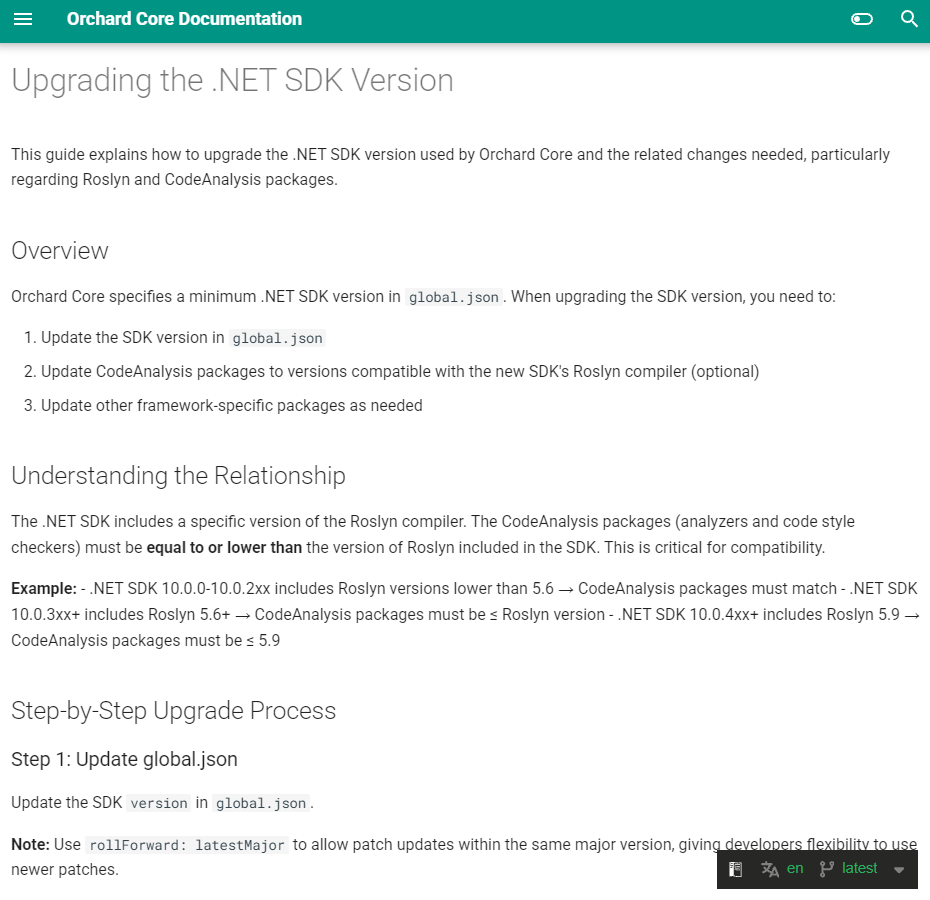
Each .NET SDK ships with a specific Roslyn compiler version, and the Microsoft.CodeAnalysis.* packages must be the same version as that Roslyn or older. Georg von Kries clarified this relationship and enforced stricter version alignment in CI and dependency management.
CI now always uses the exact SDK version specified in global.json, the CodeAnalysis versions are pinned, and automatic updates for the CodeAnalysis packages are disabled to prevent compatibility issues. The checklists and documentation were updated too, and there's a new guide for SDK upgrades.
For example, SDK 10.0.3xx and later include Roslyn 5.6 or newer, and SDK 10.0.4xx includes Roslyn 5.9, so with it, the CodeAnalysis packages can go up to 5.9. Check out the Upgrading the .NET SDK Version guide for the step-by-step upgrade process!
Demos
New admin list layouts
Admin lists can now be rendered with different layouts. Mike Alhayek added a reusable AdminList shape to the Admin module, with two built-in layouts:
- List: the look Orchard Core has today, where each row is the item's SummaryAdmin shape.
- Grid: one column per AdminListColumn, laid out with a CSS grid. Each row is the item's SummaryAdminGrid shape, and each cell renders the zone named after its column. The header and every row are subgrids of the list, so the header always lines up with the data, and each row keeps a box of its own to drag.
Go to Settings -> Admin and pick the layout from the List layout dropdown. The row actions are rendered by the new AdminListActions shape, in the layout you select under List actions layout:
- Buttons: the existing look.
- Menu: a single compact dropdown, opened by an ellipsis button.
Both dropdowns also have a Use configuration default option. The shipped defaults live in the new AdminListOptions, so a site can change them per tenant in appsettings.json, under OrchardCore:Admin:List with DefaultLayout and DefaultActionsLayout. Every admin list uses these settings, from the content items to the features, the tenants, the workflows, and the layers, so they all switch layout together.
The third new setting is the Let users choose the layout of a list checkbox. With it on, every list shows a List/Grid selector. A click reloads the page with ?layout=Grid, and the choice is kept in a cookie per list. So one user can read the content items as a grid while another reads them as a list, without changing anything for the site. The pager and the page size selector keep the selected layout.

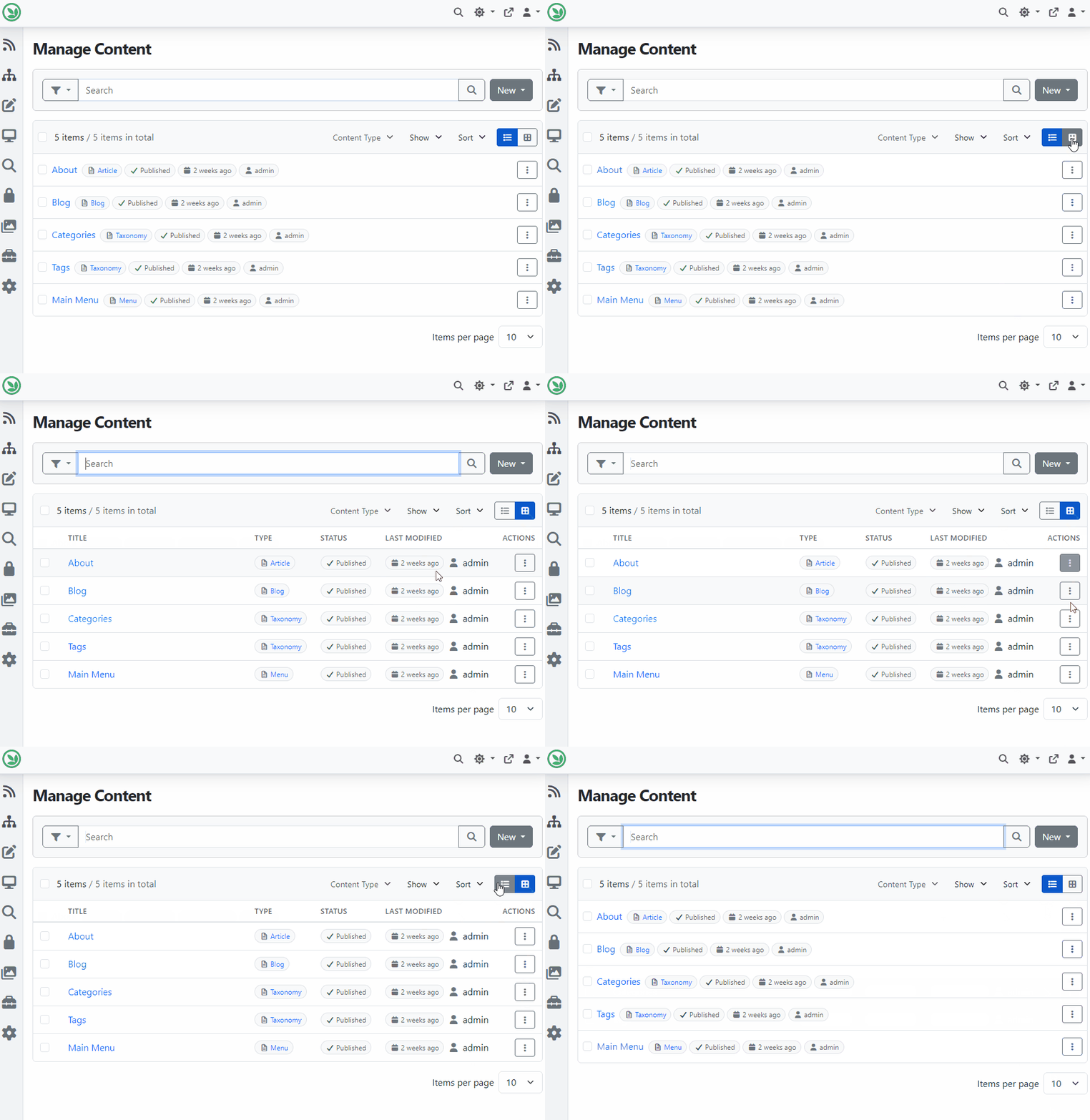
We selected Grid as the List layout and Menu as the List actions layout, letting users choose the list layout. Now go to Content -> Content Items to see the new layout. Each column has a header (Title, Type, and so on), and the badges are organized into these columns. Instead of the Edit, View, and Actions buttons, the Actions column has a dropdown menu with the same actions.
Since we let users choose the layout, there's also a selector above the Actions column to switch between the grid and the list layout.
Check out the release notes for all the details, and head to YouTube for a recording!
News from the community
A new website using Orchard Core: SBK Healthcare
SBK Healthcare organizes in-person conferences, online forums, and webinars for managers, nurses, and clinicians working in the National Health Service. Check out their Orchard Core site on Show Orchard!

For more Orchard Core sites in the wild, visit Show Orchard, a community showcase of representative Orchard CMS and Orchard Core websites maintained by Lombiq Technologies. Show Orchard itself runs on Orchard Core on DotNest. Read the case study on how we migrated it from Orchard 1!
If you're considering a similar migration, the Lombiq team is happy to help. Get in touch!
Orchard Dojo Newsletter
Lombiq's Orchard Dojo Newsletter has 402 subscribers! We have started this newsletter to keep the Orchard community informed about the latest platform news. By subscribing to this newsletter, you will receive an email whenever a new post is published to Orchard Dojo, including 'This Week in Orchard', of course.
Do you know of other Orchard enthusiasts who would like to read our weekly articles? Tell them to subscribe here!