AI Initial Prompt Behavior and AI Chat Session Analytics, Speaker application deadline for Orchard Harvest extended to May 15 - This week in Orchard (08/05/2026)
This week, Mike Alhayek shows new features to the AI Suite: Initial Prompt, data extraction, post-session processing, and AI Chat Session Analytics!
But before that, check out how Hisham Bin Ateya and Georg von Kries improved the feature dependency display and interactivity, and the new protect global method provider by Mike Alhayek!
Harvest speaker applications are now open until May 15! If you’ve been considering speaking at Orchard Harvest, this is a great opportunity to share your ideas with the Orchard Core community. Join us on the 10th and 11th of September in Vancouver!
Let's see the details!
Orchard Core updates
Improve feature dependency display and interactivity
There is a minor UI issue on the Features page: the dependency tags for some features can be crowded because they recursively list all dependencies for a module.
Hisham Bin Ateya had an idea to fix this by not listing all the dependencies here. And after a discussion with Georg von Kries, the final decision was to show only the direct dependencies by default. Transient dependencies are hidden by default and revealed by clicking the ellipsis icon, which then displays a Show indirect dependencies tooltip.
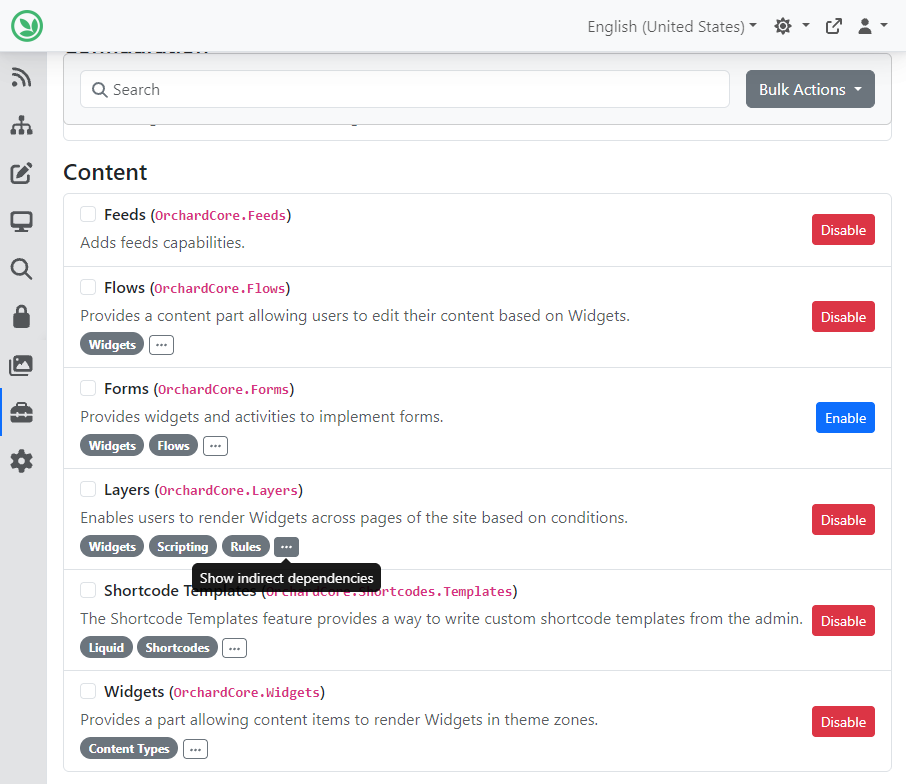
As you can see, we are on the Features page under Tools, and we hover over the ellipsis icon next to the Layers feature. The Layers feature has three direct dependencies (Widgets, Scripting, Rules), and clicking the ellipsis icon shows the indirect dependencies as well.
New protect global method provider
Mike Alhayek added a new global method provider, protect, to the list of JavaScript methods provided by Orchard Core, which can be used to protect the specified value using the ASP.NET Core Data Protection API with the given purpose string. Let's see how it's working!
First, we navigated to Tools -> Features and enabled the View or Download Content as JSON feature, which added the JSON Import option under the Tools -> Deployments submenu. Here you can see that we stored our my-secret-value secret in the ApiKey setting, which is part of the MyModule module.
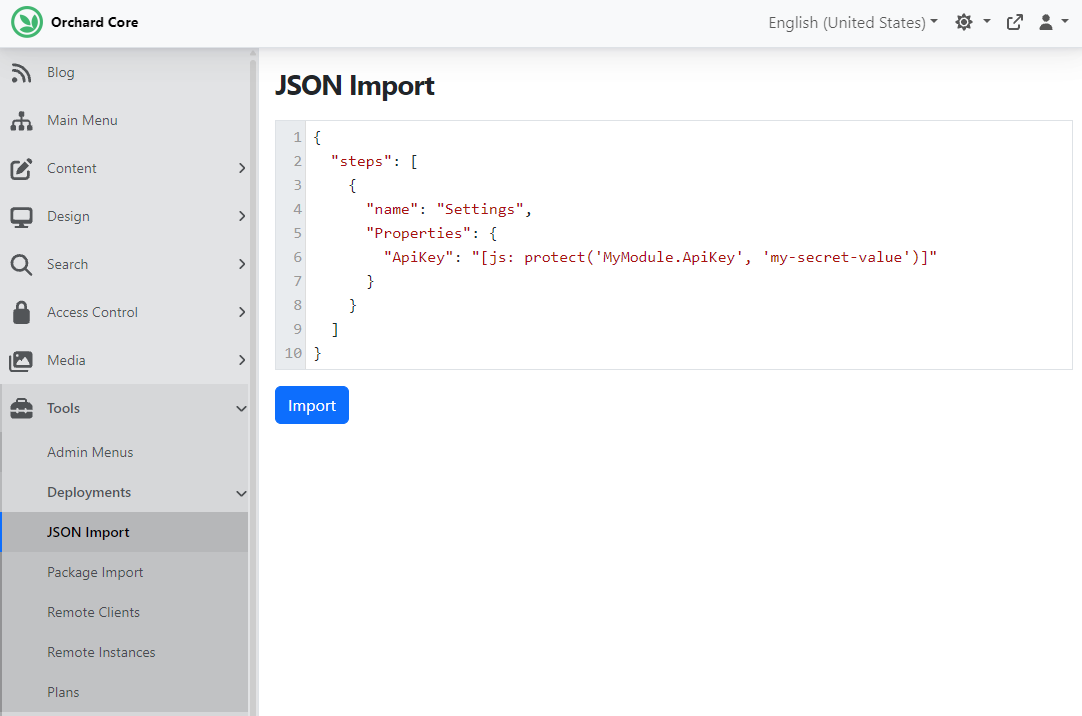
Please note that the protect function is intended for use only in development and testing scenarios. Storing secrets in recipe files for production environments is not recommended and should be avoided. Use a secure secret management solution (e.g., Azure Key Vault, environment variables) for production deployments.
Demos
AI Initial Prompt Behavior and AI Chat Session Analytics
In the Profiles now, you have more power, more capabilities to do more things in the AI Suite, like data processing after the session has ended.
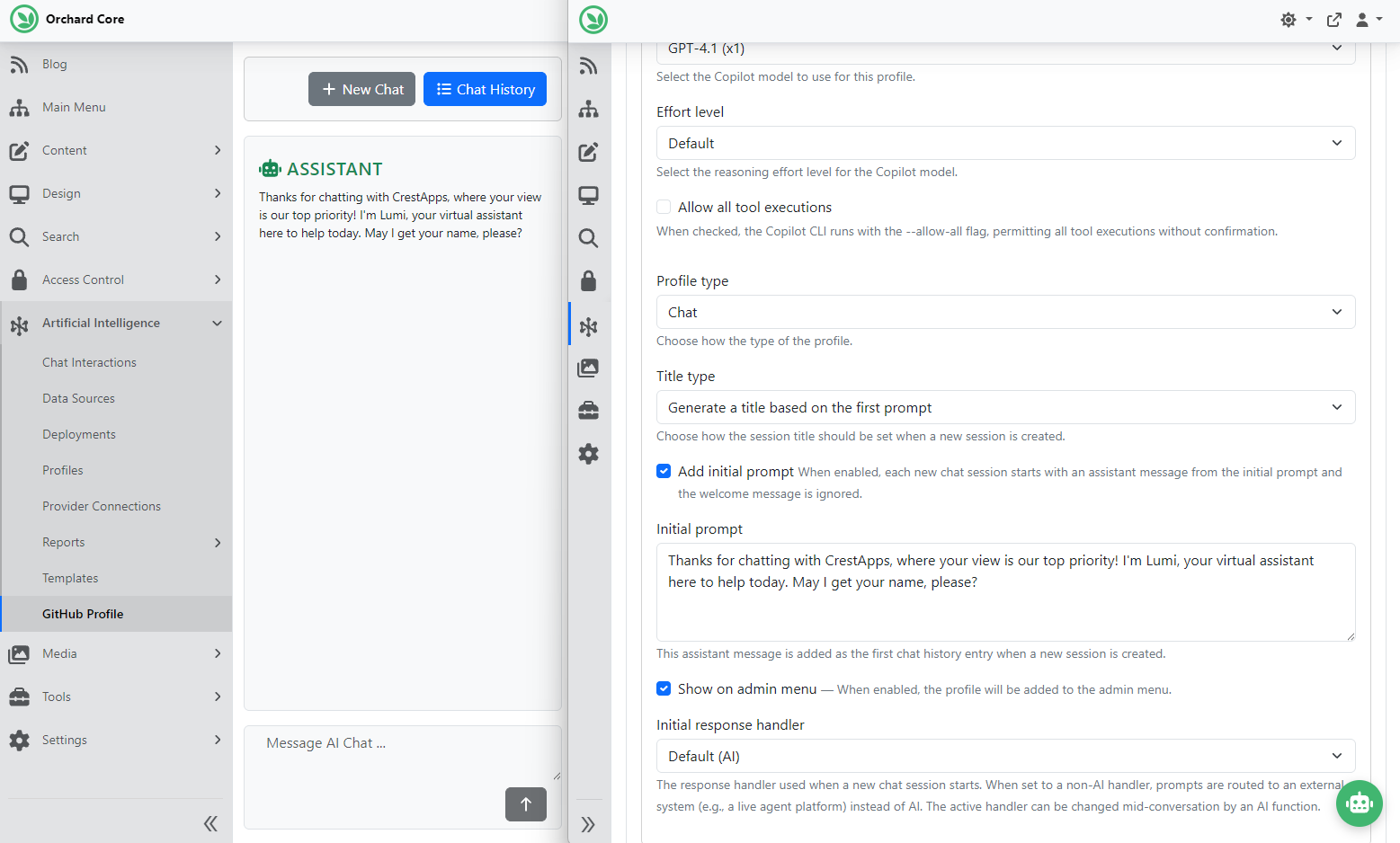
But before that, there is another thing that Mike Alhayek added, which is to set up an initial prompt. If the initial prompt is enabled on the profile, the session is created immediately with an assistant message from the configured Initial prompt, which appears in chat history when the page loads or when a new session is started. It's a nice-to-have feature, for example, for chat widgets, where the chat widget can immediately welcome the user with some initial message. We have a profile called GitHub profile, and immediately after we start a new chat session with it, it greets us with the initial prompt we provided.
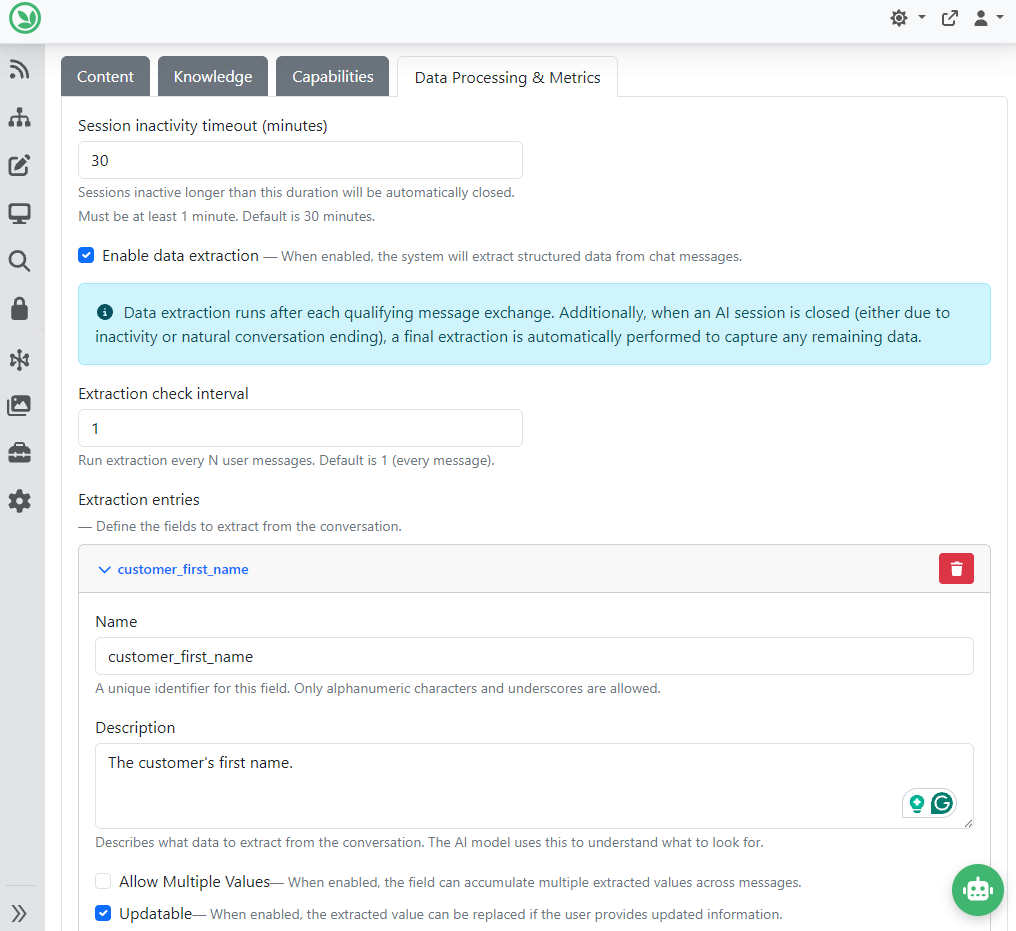
Now let's move on to the Data Processing & Metrics tab. If you want to extract data or do something with the data for a chat session, you can enable data extraction by putting a tick in the Enable data extraction checkbox, and you can add extraction entries by clicking the Add Entry button. Here you can see we say to extract the customer's first name, last name, and email address.
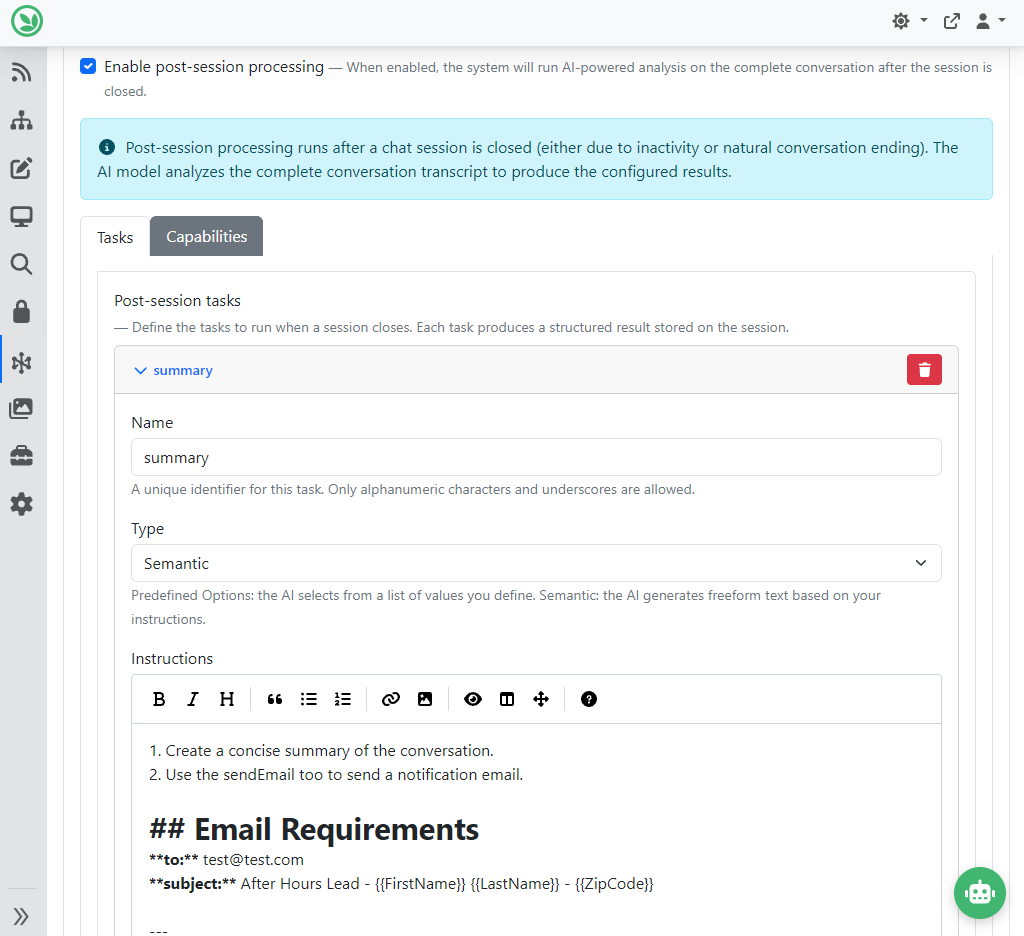
There is another option called post-session processing, which you can enable by putting a tick in the Enable post-session processing checkbox. Here, you can add tasks you want to do after the session ends. Like, create a task here that just generates a summary of the conversation and sends me an email. In this case, we will know what people are doing with our chat widgets. And in the Instructions, we say to create a summary, use the sendEmail tool, and set up the email subject, body, and so on.
You can also enable session metrics. When you do that, session metrics such as usage, token consumption, response latency, and user feedback are captured for analytics. Metrics can be viewed in the Chat Analytics dashboard. The other thing you can do is to enable conversation metrics. When enabled, AI evaluates each session against defined goals and assigns scores to measure session success and conversion rates. This operates independently of session metrics.
Now let's talk about analytics! The AI Chat Session Analytics feature provides comprehensive analytics and reporting for AI chat sessions. By using it, you can track conversation metrics, user engagement, model performance, and user satisfaction through an admin dashboard. Once you enable the AI Chat Session Analytics feature under Tools -> Features, you will find the analytics dashboard under Artificial Intelligence -> Reports -> AI Chat Session Analytics. The analytics dashboard provides a comprehensive view of AI chat performance through multiple report sections. You can use the filters panel at the top to narrow results by date range and AI profile.
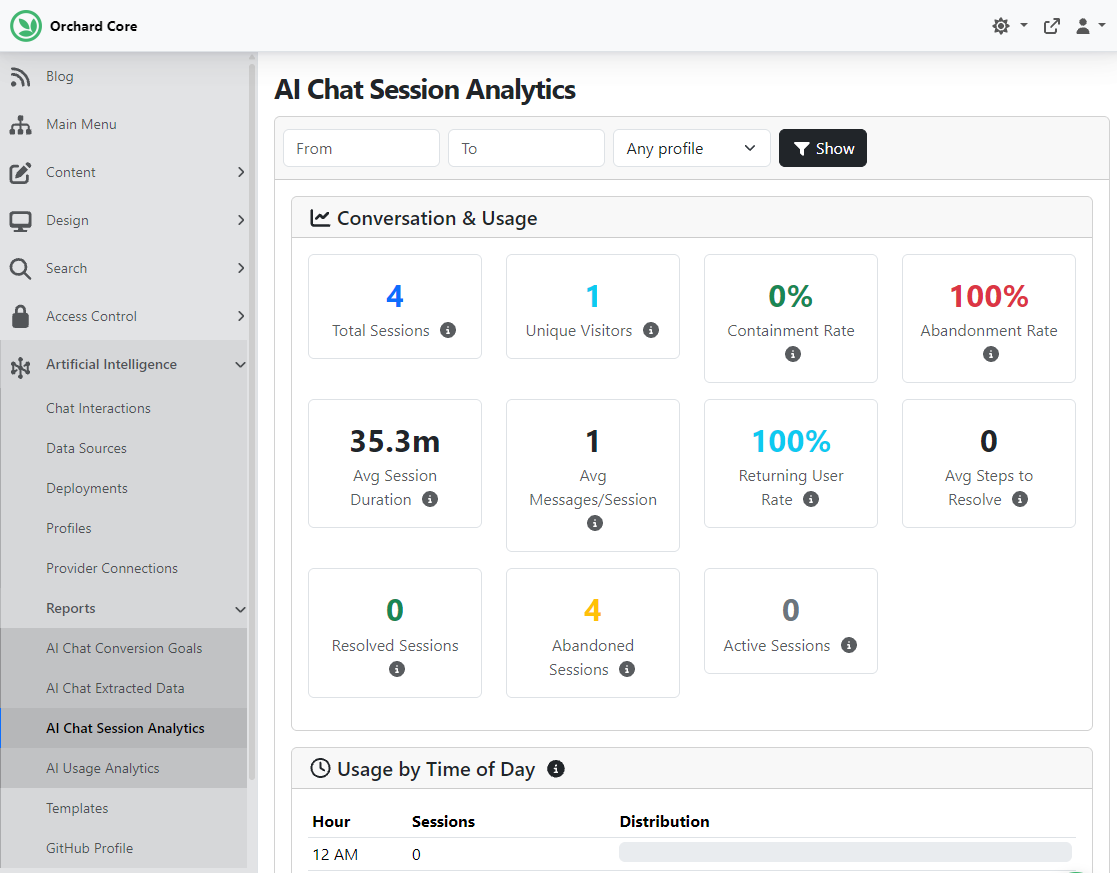
And as always, if you want to see this feature in action, head to YouTube for a recording by Mike Alhayek, and don't forget to check out the official documentation to read more about the dashboard and the metrics!
News from the community
Speaker application deadline for Orchard Harvest extended to May 15
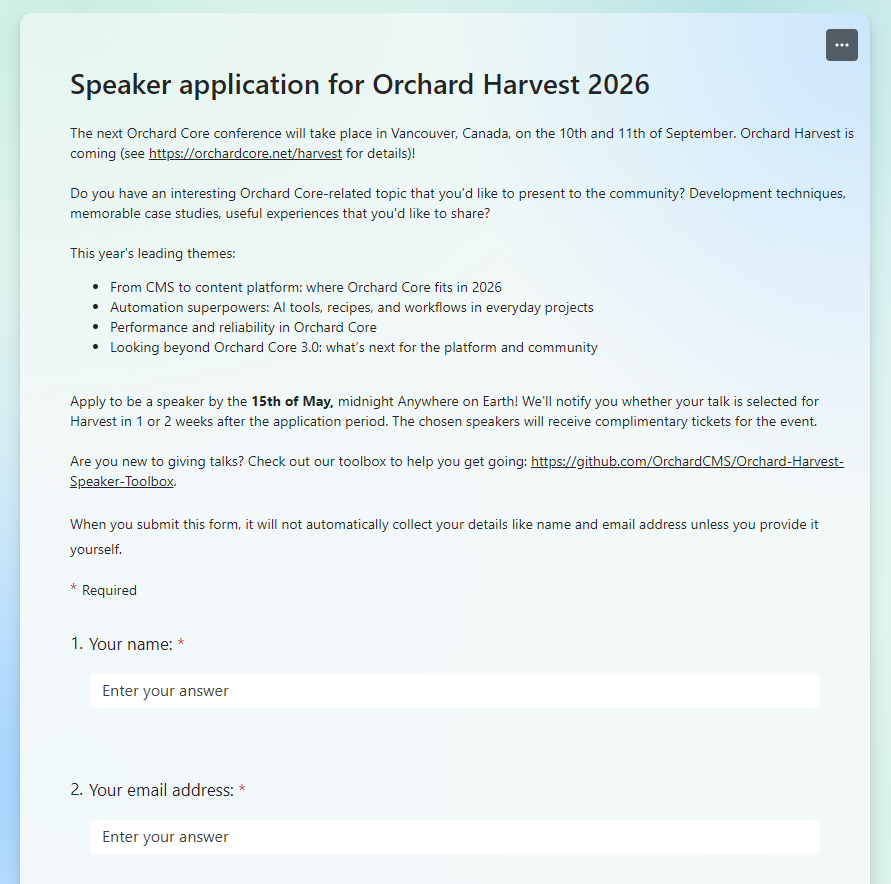
The next Orchard Core conference will take place in Vancouver, Canada, on the 10th and 11th of September.
Do you have an interesting Orchard Core-related topic that you'd like to present to the community? Development techniques, memorable case studies, and useful experiences that you'd like to share?
This year's leading themes:
- From CMS to content platform: where Orchard Core fits in 2026.
- Automation superpowers: AI tools, recipes, and workflows in everyday projects.
- Performance and reliability in Orchard Core.
- Looking beyond Orchard Core 3.0: what’s next for the platform and community.
Application form: https://forms.office.com/pages/responsepage.aspx?id=Wt6elek45kStyIVVO-uCICDdeeZFbXdAlSWTkdgpZAtUQzA3UzVNUERJTk4zVlEwRUtXNkM2SlI4Sy4u
Apply to be a speaker by the 15th of May, midnight, anywhere on Earth! We'll notify you whether your talk is selected for Harvest in 1 or 2 weeks after the application period. The chosen speakers will receive complimentary tickets for the event.
The 8th Orchard Harvest Conference was held in Prague on the 11th and 12th of November, 2025. We recorded every session, and are currently publishing them on the Orchard Core YouTube channel. The videos are published every Monday, Wednesday, and Friday at 4:00 PM UTC. If you haven't done so yet, subscribe to this YouTube channel for the Harvest videos and some inspiration if you are considering being a speaker this year! Here you can find the playlist for last year's Harvest recordings.
Orchard Dojo Newsletter
Lombiq's Orchard Dojo Newsletter has 419 subscribers! We have started this newsletter to keep the Orchard community informed about the latest news on the platform. By subscribing to this newsletter, you will receive an email whenever a new post is published to Orchard Dojo, including 'This Week in Orchard', of course.
Do you know of other Orchard enthusiasts who would like to read our weekly articles? Tell them to subscribe here!