Content Transfer module, a new website using Orchard Core - This week in Orchard (15/05/2026)
This week, Mike Alhayek shows the upcoming Content Transfer module that provides bulk import and export of content items using Excel files!
But before that, check out how Hisham Bin Ateya improved the Health Checks feature to report the status for the Twilio SMS service.
We also want to highlight a new site built with Orchard Core: JobsIreland!
Let's see the details!
Orchard Core updates
SMS Health Checks feature
The Health Checks module enables the health checks feature from ASP.NET Core, and the health check endpoint is available at /health/live for each tenant. This module now includes a health check that reports the status of the Twilio SMS service. Thanks for the contribution by Hisham Bin Ateya!
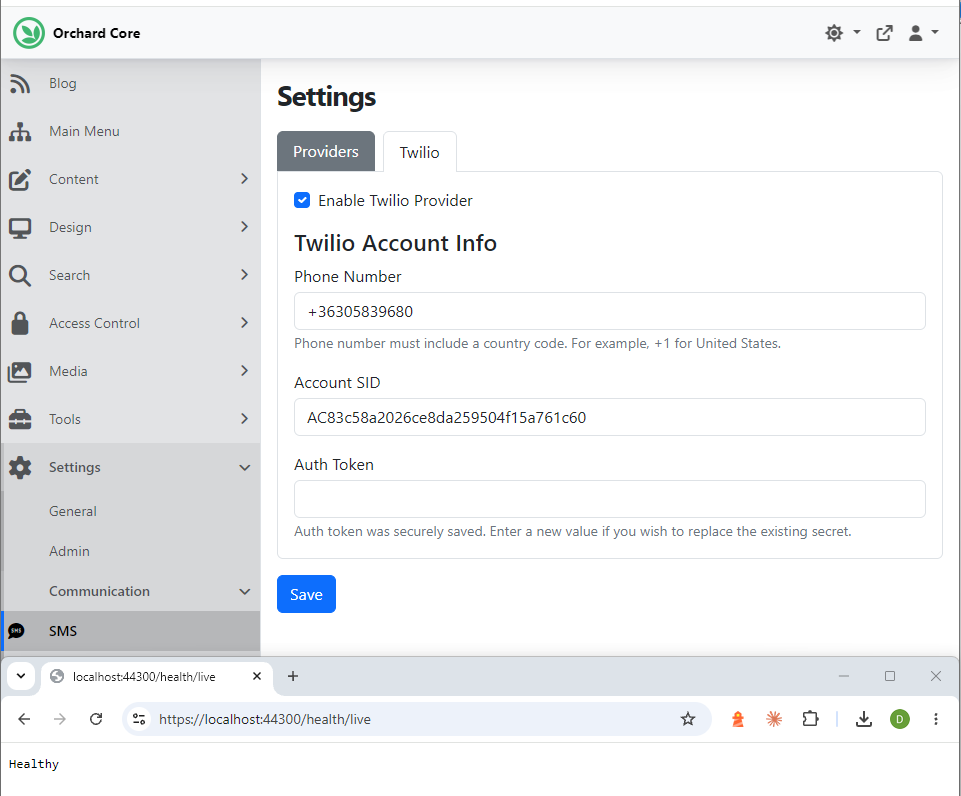
To make this work, don't forget to enable Health Checks and SMS features under Tools -> Features. Once you have that, head to Settings -> Communication -> SMS and set up your Twilio Account Info on the Twilio tab. As you can see here, the status is Healthy, which means we set up our Twilio account correctly and Twilio itself is working.
Reduce allocations by using .TryGet<> method over .As<>
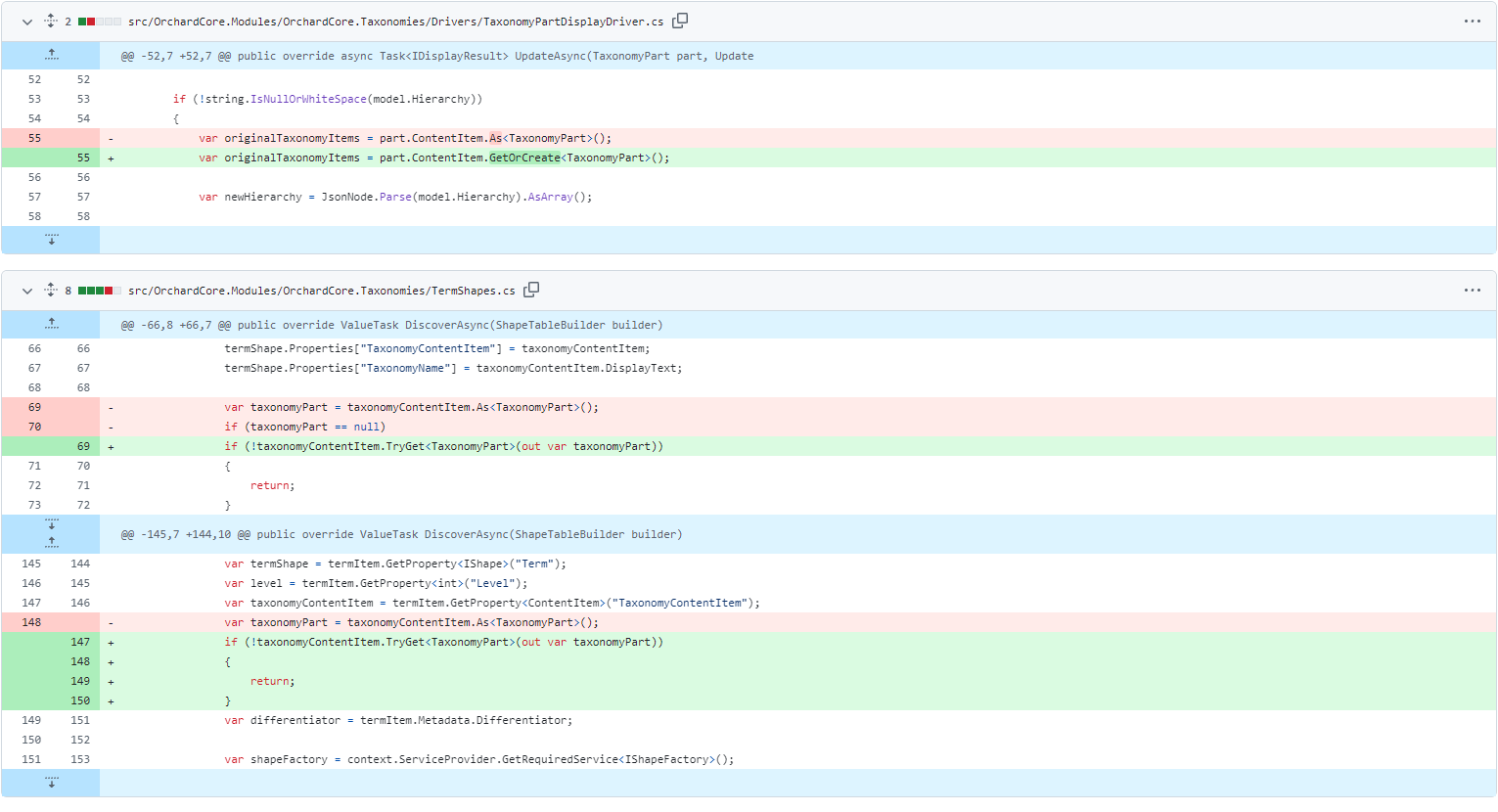
The ISite interface now includes a new method, bool TryGet<T>(out T settings), to support checking for optional site settings without allocating a new instance when a settings object is missing.
This is a minor breaking change for custom ISite implementations, which must now implement this method.
So, if you check out the changes in Orchard, you can see that we prefer .TryGet<> method over .As<> to reduce allocations, and prefer .TryGet<> and .GetOrCreate<> extensions to improve readability. Thanks for the contribution by Mike Alhayek!
Demos
Content Transfer module
This time, Mike Alhayek introduces the new Content Transfer module, which provides bulk import and export of content items using Excel files. You can find the code for this module in this pull request.
First, let's head to Tools -> Features and enable the Content Transfer module to import and export content to and from Excel files. This allows us to configure a content type to make it importable and exportable.
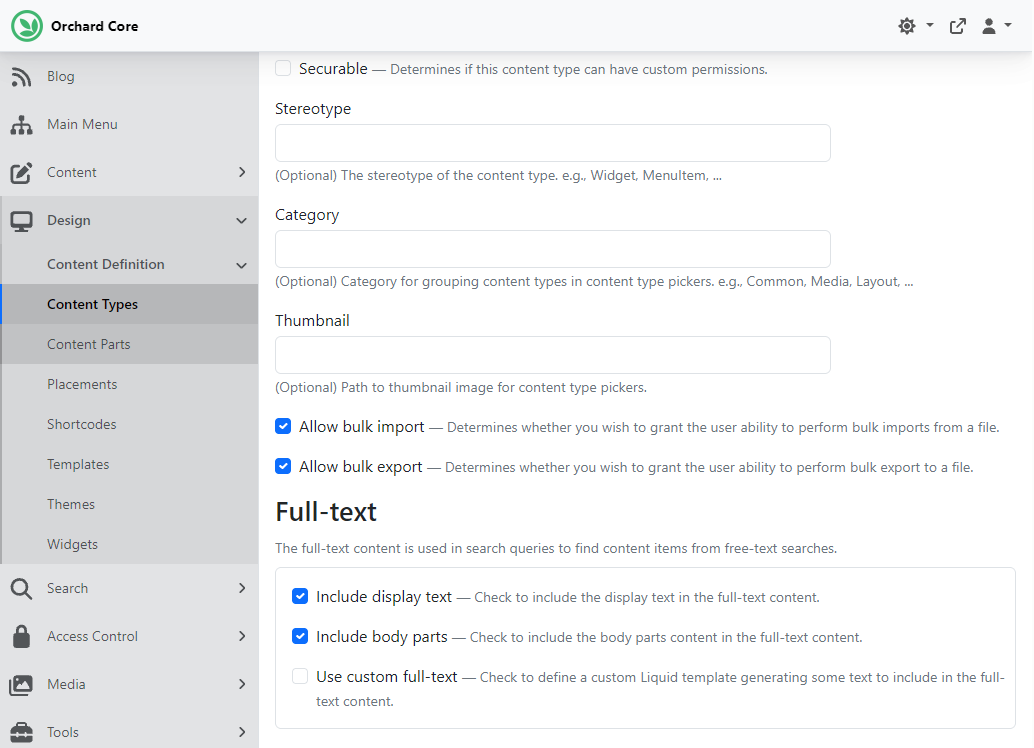
Let's say we want to make the Article content type importable and exportable. To do that, we need to navigate to Design -> Content Definition -> Content Types and hit Edit near the Article one. Put a tick in the Allow bulk import and Allow bulk export checkboxes.
Once you have that, you can go to Content, where you will see the two new options: Bulk Export and Bulk Import. We want to export, so we select the Bulk Export option and click the Export button in the upper right. We select the Article from the Content type drop-down (that's the only content type we can export right now), and if we select Partial Export as the Export scope, we can filter down the data. We can filter by owners or version, or specify the date range for created and modified. For now, we simply export all published and click the Export Data button.
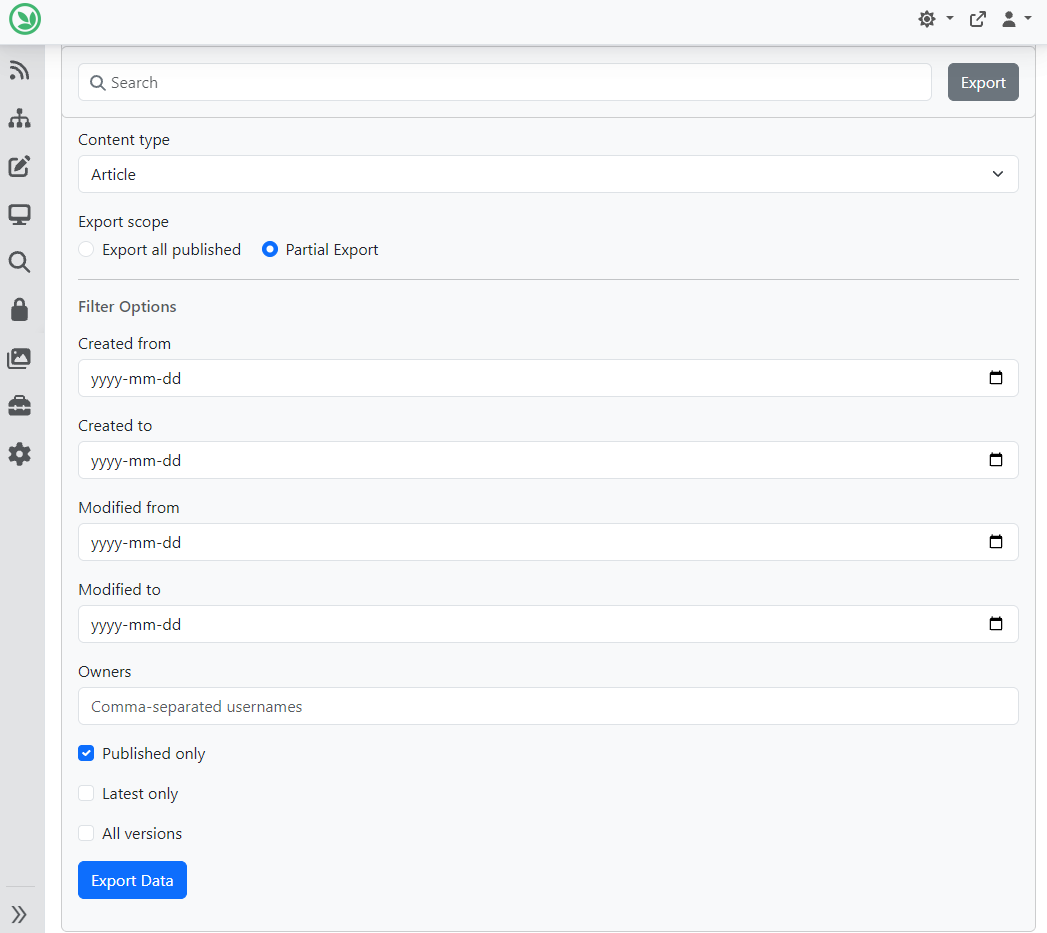
When you do that, it provides you with these files in two ways. If there are only a few items, it returns the file in real time. If there are too many, it will queue them for later access. And to access it later, you can use the list on the Bulk Export page to download the data you require.
If we want to import data, we need to select the Bulk Import option from the menu. Hitting the Import button in the top-right corner lets you select the content type you want to import. First of all, based on the content type, you can see the file's requirements, such as accepted file formats and file size limits. Under you can see the column requirements, such as which fields are required. You can also download a template to see a sample of the accepted file format.
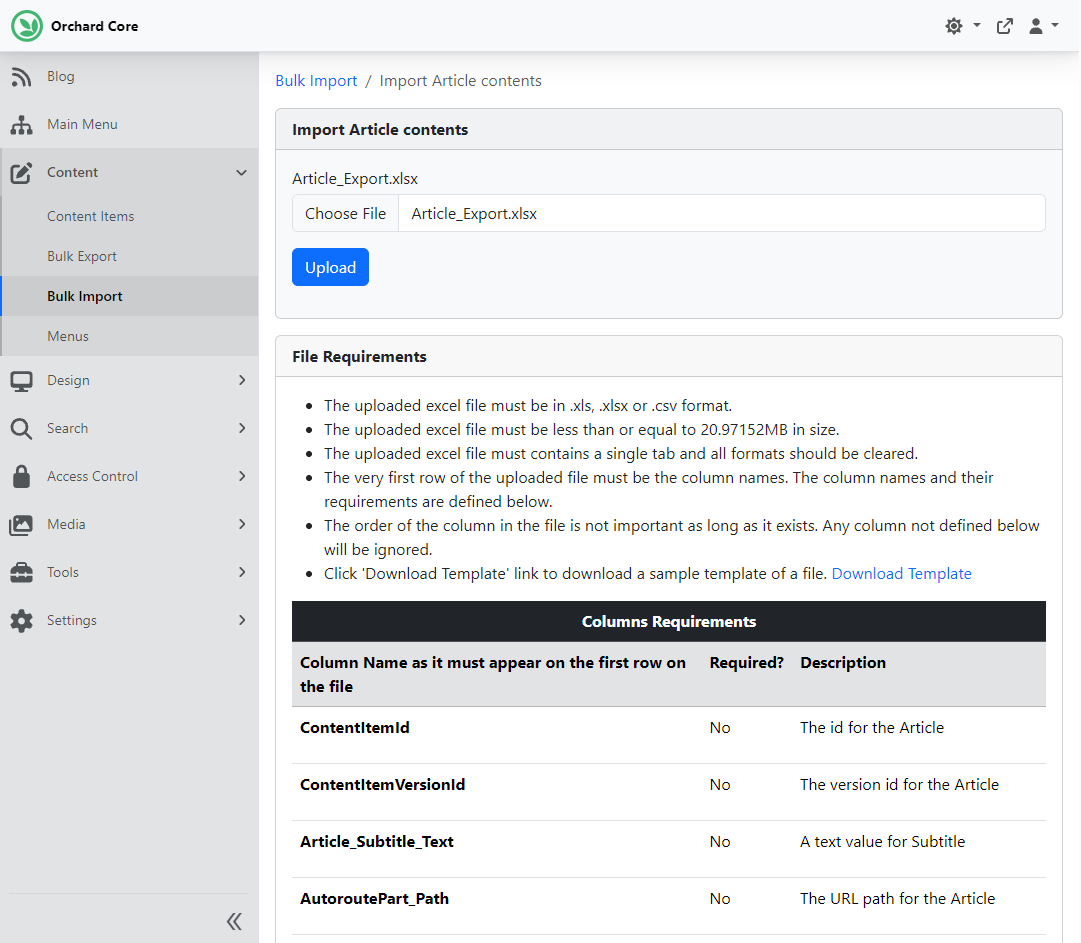
Hitting Upload will start importing the records in the background. At the list on the Bulk Import page, you can see the progress of the import, and the errors if you have any (like "Your permalink is already in use" if the AutoroutePart_Path contains an existing permalink).
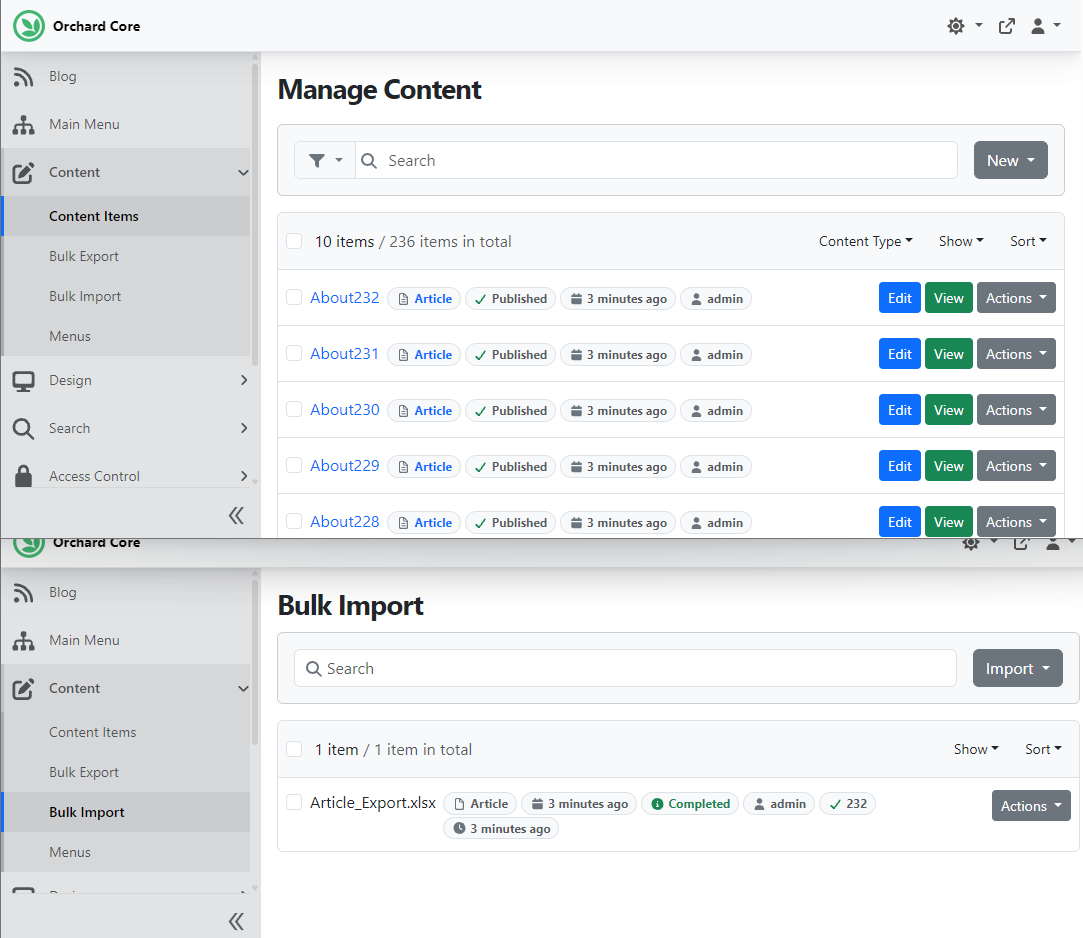
As you can see, the Bulk Import page shows we imported 232 articles, and the process completed without any errors. If we navigate to Content -> Content Items, we can see several Article content items that we just created a few minutes ago.
And as always, if you want to see this feature in action, head to YouTube for a recording!
News from the community
A new website using Orchard Core: JobsIreland
At JobsIreland, they aim to help people to get jobs and help employers connect with the right people. Whether you're looking for your next job or finding the right person to join your team, JobsIreland can help you. Check out their Orchard Core site here!

If you are interested in more websites using Orchard and Orchard Core, don't forget to visit Show Orchard. Show Orchard is a website that showcases representative Orchard CMS and Orchard Core websites from around the internet. Ryan Drew Burnett started it, but since he no longer works with Orchard, it is now maintained by our team at Lombiq Technologies. Oh, and in case you haven't heard about it yet, Show Orchard is also running on Orchard Core in DotNest for more than two years now! Here's the case study about how we migrated it from Orchard 1!
If you're considering migrating your Orchard 1 website to Orchard Core, this is an excellent time. Should you have any questions or encounter challenges, don't hesitate to reach out to us. We're always ready to bring our expertise to your unique project needs. Get in touch with us today, and let's start making your Orchard Core website even better!
Orchard Dojo Newsletter
Lombiq's Orchard Dojo Newsletter has 418 subscribers! We have started this newsletter to keep the Orchard community informed about the latest news on the platform. By subscribing to this newsletter, you will receive an email whenever a new post is published to Orchard Dojo, including 'This Week in Orchard', of course.
Do you know of other Orchard enthusiasts who would like to read our weekly articles? Tell them to subscribe here!