Privacy-friendly analytics and URL shortening, store user state in Audit Trail - This week in Orchard (11/09/2026)
Want a more useful landing page when you open the admin area? The Admin Dashboard's default content just got a redesign, with new documentation on how to extend it yourself.
Need an audit trail of who changed which user, without leaking sensitive data into your database? Users Audit Trail now lets you control exactly what gets stored, redacted, or hashed per property.
And want privacy-friendly analytics and UTM tracking without a cookie banner? Lombiq Marketing, a new open-source module, adds cookie-free Pirsch analytics and a built-in URL shortener.
This week's changes come from Antoine Griffard and Sára El-Saig.
Orchard Core updates
Improve the Admin Dashboard content
The OrchardCore.AdminDashboard module lets you build the admin landing page from widgets. Each widget is a regular content item, so you can edit, secure, version, and localize it like any other content.
If you go to Tools -> Features and enable the Admin Dashboard feature, you will notice improved default content on the admin landing page.

This improvement comes from Antoine Griffard. Several new shapes are rendered on this page, like AdminDashboardContents.cshtml, which shows how to construct these kinds of cards. A new documentation section explains how to extend the admin dashboard by registering a shape table provider, and the existing Admin Dashboard module documentation now covers the dashboard-related permissions, the built-in widget types, and how to create dashboard widgets from a recipe.
Store user state in Audit Trail
Enable the Users Audit Trail feature under Tools -> Features so user events such as user creation, updates, or deletion are logged in Tools -> Audit Trail. By default, events store the user's name and ID in addition to the common Audit Trail data.
To prevent storing particularly sensitive data, this functionality is limited by default. Go to Settings -> Security -> User Audit Trail and select which properties or custom user settings to store. Here you can choose from multiple options:
- Store: Stores the value of the property as a string.
- ErasingRedactor: Stores an empty string instead of the value. This indicates that the property exists for the User object in question.
- PartialAsteriskRedactor: Stores the value as a string, but the middle characters are redacted. For example, SampleUser becomes S********r.
- HmacRedactor: Uses "HMAC SHA-256" to encode the data before storing it, as a hash or fingerprint. This redactor is only available when both HmacRedactorOptions.Key and HmacRedactorOptions.KeyId are configured. For security reasons, these values should be unique per tenant. To load the options, you need to bind the settings manually.
We set it up to store the email, store only an empty string for EmailConfirmed, and redact the middle characters of the PhoneNumber.
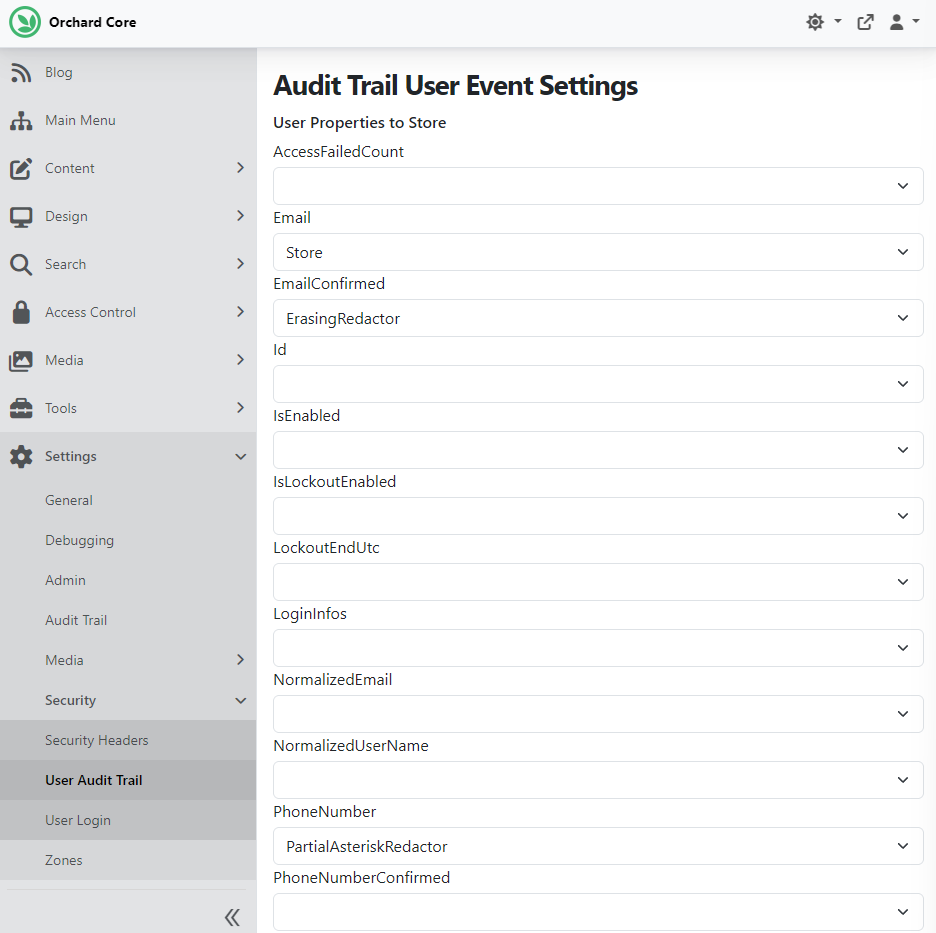
We created a new user via the Add User button under Access Control -> Users. Now let's see how Audit Trail stored this event in the database.
We set up our site using SQLite, so we can use an app like DB Browser for SQLite to check the content of our DB file. You can find the OrchardCore.db file under src\OrchardCore.Cms.Web\App_Data\Sites\Default (if you have only one tenant). Open it with the DB Browser for SQLite app and find the table called Audit_Document. If we check the latest record there, we will find the user created event, and inside the Snapshot JSON Object, we will see that the Email is stored as a string; there is an empty string stored for the EmailConfirmed property, and the middle characters of the PhoneNumber are redacted. Thanks to Sára El-Saig for the contribution.

Demos
Privacy-friendly analytics and URL shortening with Lombiq Marketing
Lombiq Marketing is a new open-source module for Orchard Core that adds privacy-friendly analytics and a built-in URL shortener. It integrates Pirsch, a cookie-free analytics service that stores no personal data, so it's GDPR-compliant without a consent banner. The module proxies the tracking script and its endpoints through your own domain, so ad blockers and privacy extensions don't create gaps in your data.
The URL shortener creates clean short links with UTM parameters attached; on redirect, those values are sent to the analytics service server-side, before the browser redirect happens, so campaign tracking survives even when the client blocks it.
The easiest way to try it out is to clone our Open-Source Orchard Core Extensions solution. This Orchard Core Visual Studio solution includes most of Lombiq's open-source Orchard modules and themes, plus related utilities and libraries, including our Marketing-related features with detailed documentation.
Once you run our Open-Source Orchard Core Extensions solution and set up your site, you can enable the Marketing-related features:
- Lombiq Marketing - Pirsch analytics: Integrate the basics of Pirsch analytics into Orchard Core.
- Lombiq Marketing - URL Shortener: Adds a Short URL content type for managing short redirects.
Now we can go to Settings -> Marketing -> Pirsch and set up the Pirsch integration. You can check out the readme file of the feature and the official Pirsch documentation for more info.

Now let's see the URL Shortener feature. You can manage your Short URLs under Tools -> Short URLs, setting the destination URL (absolute or relative) on the URL tab. The most interesting part is the UTM Parameters tab, where you set the UTM parameters that get sent to Pirsch.

To learn more about this module, check out our post on Lombiq.com. To try it out in a few clicks, head to your DotNest site or watch a recording on YouTube.
If you are considering using this module or want to understand how it would fit into your current setup, we are happy to help. Whether it is about implementation, analytics strategy, or adapting it to your marketing workflows, feel free to reach out and discuss your scenario with us.
Orchard Dojo Newsletter
Lombiq's Orchard Dojo Newsletter has 406 subscribers! We have started this newsletter to keep the Orchard community informed about the latest platform news. By subscribing to this newsletter, you will receive an email whenever a new post is published to Orchard Dojo, including 'This Week in Orchard', of course.
Do you know of other Orchard enthusiasts who would like to read our weekly articles? Tell them to subscribe here!